Installation
Installing GodotXterm means getting the files from addons/godot_xterm into your Godot project and ensuring the GDExtension binary files are in place at addons/godot_xterm/lib for your target platforms.
Note
If you want to customize the GDExtension you will need to compile the C/C++ code from source. See Building from source for information on how to do this.
Get the files
There are several ways to get the files:
Godot Asset Library
The easiest way to install GodotXterm is from the official Godot Asset Library.
Open your Godot project.
Go to the AssetLib tab at the top of the editor.
Note
If this is your first time using the Asset Library, click Go Online to connect.
Search for “GodotXterm” (or “terminal” to see GodotXterm along with a range of other terminal addons).
Click on the GodotXterm result and then Download.
In the installation dialog, make sure to uncheck “Ignore asset root” so the addon is installed under
addons/godot_xterm.
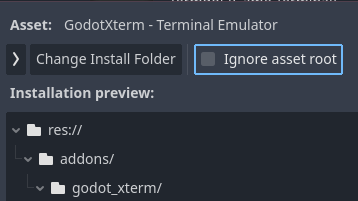
Click Install and OK to complete the installation.
The addon files (along with GDExtension binaries) will be automatically placed in your project’s addons/godot_xterm directory.
Manual
Download the latest
godot-xterm-v<version>.zipfile from the Assets section of the Releases page for the release you wish to install.Tip
See the CHANGELOG for information about what’s new, changed, and fixed in each release.
Extract the zip file to your Godot project root directory (where your
project.godotfile is located). This will create anaddons/godot_xtermdirectory in your project with all the necessary files.Linux/macOS:
unzip godot-xterm-v4.0.0.zip -d /path/to/your/project
Windows: Right-click the zip file and select “Extract All”, then choose your project folder.
Gd-plug
Older versions of this addon could be installed using gd-plug as the binaries were committed directly to the godot-xterm-dist distribution repo. Newer releases have moved to CI-generated release assets to simplify the build and distribution process without maintaining a separate binary repo.
In the future, it may be possible to install using gd-plug using the release asset zip file URL. There is a PR to add zip support, and a modified version of plug.gd based on this might work with current releases.
Enable the plugin
Note
This step is optional. If you only need the Terminal and PTY nodes in your scenes, you can skip enabling the plugin. Plugin enablement is only required for the integrated terminal and import plugins.
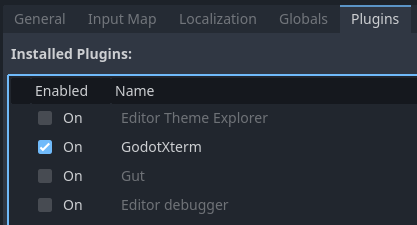
Open the plugin settings by going to Project > Project Settings > Plugins.
Check the box next to “GodotXterm”.